
Key Takeaways
- Understanding depth of field (DoF) is key to creating professional-looking photos and videos with your DSLR camera.
- Use aperture settings, lens focal length, and subject distance to control DoF for creative effects.
- Experimenting with DoF enhances storytelling in videography, graphic design integration, and 3D visualization projects.
- Practical tips like using manual focus and tripods can refine your DoF technique for crisp, cinematic results.
If you’re diving into videography or photography with a DSLR camera, there’s one tip that can instantly level up your work: mastering depth of field (DoF).
It’s the secret sauce behind those stunning shots with creamy, blurred backgrounds or razor-sharp landscapes. Whether you’re shooting for a creative services project, crafting visuals for graphic design, or even prepping footage for 3D visualization or archviz, controlling DoF will make your work pop. Let’s break down what DoF is, how to use it, and why it’s a game-changer for your creative projects.
What Is Depth of Field, Anyway?
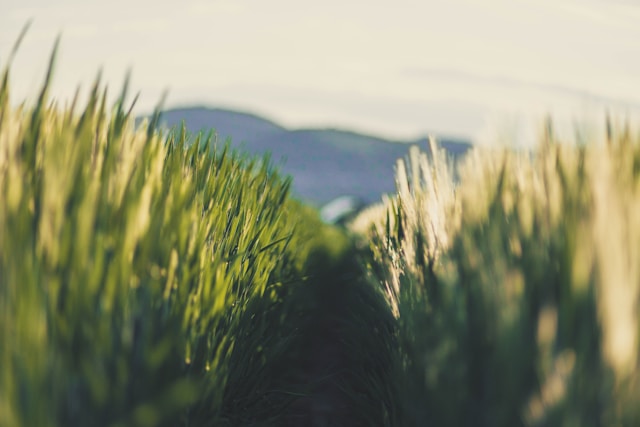
Depth of field refers to the range in your image that appears sharp and in focus. A shallow depth of field means only a small part of the image (like your subject) is in focus, while the background and foreground blur out—think portrait shots with that dreamy bokeh effect. A deep depth of field keeps everything from the foreground to the horizon sharp, perfect for landscapes or architectural visualization (archviz) shots where every detail matters.
For creative services like videography or photography, DoF is your storytelling tool. It directs the viewer’s eye, sets the mood, and adds a professional polish to your work. Plus, it’s a skill that translates beautifully when you’re collaborating on projects involving graphic design or 3D visualization, where visual hierarchy is everything.
The Three Factors Controlling Depth of Field
To nail DoF with your DSLR camera, you need to understand three main factors: aperture, lens focal length, and subject distance. Let’s unpack each one.
- Aperture (f-stop): This is the big one. Aperture controls how much light enters your lens, measured in f-stops (like f/1.8 or f/16). A lower f-stop (e.g., f/1.8) creates a shallow DoF, blurring the background for that cinematic look ideal for videography. A higher f-stop (e.g., f/11 or f/16) gives a deep DoF, keeping more of the scene in focus—great for archviz or wide shots in video production. Play with your DSLR’s aperture priority mode (A or Av) to experiment without juggling other settings.
- Lens Focal Length: Longer lenses (like 85mm or 200mm) naturally produce a shallower DoF compared to wide-angle lenses (like 24mm). For videographers or photographers working on creative services, a 50mm prime lens with a wide aperture (f/1.8 or f/1.4) is a budget-friendly way to achieve gorgeous bokeh. If you’re shooting for 3D visualization or archviz, a wider lens with a higher f-stop ensures every architectural detail stays crisp.
- Subject Distance: The closer you are to your subject, the shallower the DoF. Step back, and the DoF deepens. This is super handy for videography when you want to isolate a subject (like a product for a commercial) or for graphic design projects where you’re photographing elements to layer into digital art.
Practical Tips to Master Depth of Field
Now that you know the basics, here’s how to put DoF to work for your DSLR photography or videography projects:
- Experiment with Aperture Settings: Start with a low f-stop (f/1.8 or f/2.8) for portraits or product shots to create that blurred background. For landscapes or archviz, try f/8 or higher to keep everything sharp. Check your DSLR’s live view to preview the effect in real-time.
- Use Manual Focus for Precision: Autofocus can sometimes miss the mark, especially with shallow DoF. Switch to manual focus to ensure your subject is tack-sharp, especially for close-up videography or macro shots for graphic design assets.
- Stabilize Your Shot: A tripod is your friend when fine-tuning DoF, especially in low-light conditions or when shooting video. It keeps your DSLR steady, letting you focus on nailing the perfect focus point.
- Consider Your Creative Goals: Think about the story you’re telling. For a heartfelt video interview, a shallow DoF draws attention to the speaker’s emotions. For an archviz project showcasing a building, a deep DoF highlights intricate details, which can later be enhanced in 3D visualization software.
- Post-Production Polish: If you’re integrating your footage or photos into graphic design or 3D visualization projects, software like Adobe Photoshop or Blender can enhance DoF effects. For example, you can add subtle blur to mimic shallow DoF or sharpen details for archviz renders.
Why Depth of Field Matters for Creative Services
Whether you’re a videographer, photographer, or creative services professional, DoF is a versatile tool that elevates your work. For videography, it creates cinematic visuals that captivate audiences. In graphic design, photos with controlled DoF can become striking assets for posters, social media, or branding. For 3D visualization and archviz, deep DoF ensures architectural renders look realistic and detailed, appealing to clients in real estate or design.
Plus, mastering DoF makes you a more versatile collaborator. If you’re working with a web design team, high-quality images with intentional DoF can enhance website visuals, boosting user engagement and SEO. Pairing these visuals with a StoryBrand marketing strategy—where clear, compelling imagery supports a brand’s narrative—can make your creative services stand out even more.
Get Out There and Shoot!
Grab your DSLR camera and start playing with depth of field. Try shooting the same subject at different f-stops, distances, and focal lengths to see how the mood changes. Whether you’re crafting a video for a small business, designing graphics for a marketing campaign, or rendering 3D visualizations, DoF will give your work that professional edge. I hope this tip helps you to elevate your camera and creative skills!
Contact
Interested in exploring creative possibilities with Dream Maker Media? Send us a message!