
Key Takeways
- Invest in a quality microphone and pop filter for crisp, professional audio.
- Optimize your recording environment to minimize background noise and echo.
- Use simple editing techniques to enhance clarity and keep listeners engaged.
- Leverage audio mastering tools to polish your podcast’s sound.
- Test and monitor your audio setup regularly for consistent quality.
Whether you’re just starting out or you’re a seasoned pro looking to level up, nailing your audio quality is the key to keeping your audience hooked. A great podcast isn’t just about killer content—it’s about delivering it with crystal-clear sound that makes listeners feel like they’re right there with you. In this post, I’m sharing some practical audio tips and tricks to elevate your podcast game, packed with searchable keywords like podcast production, audio editing, and professional podcasting to help you get found by those seeking creative services. Let’s dive in!
1. Choose the Right Microphone for Your Budget
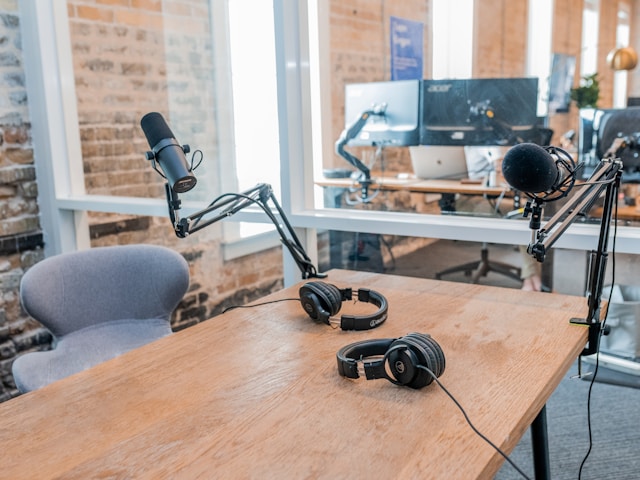
Your microphone is the heart of your podcast’s sound. You don’t need to break the bank, but investing in a decent mic is non-negotiable. For beginners, the Audio-Technica ATR2100x-USB is a solid choice—affordable, versatile, and delivers great sound for podcast production. If you’re ready to step it up, the Shure SM7B is a favorite among pros for its warm, broadcast-quality tone. Pair it with a pop filter to cut those pesky plosive sounds (like “p” and “b” pops), and you’re already on your way to sounding like a pro. Pro tip: USB mics are plug-and-play for beginners, while XLR mics with an audio interface give you more control as you grow.
2. Set Up Your Recording Space Like a Pro
Your recording environment can make or break your audio quality. You don’t need a fancy studio—just a quiet space with some tweaks. Start by choosing a room with soft furnishings like carpets or curtains to dampen echo. If you’re dealing with a “live” room (think hardwood floors or bare walls), hang blankets or invest in foam panels to absorb sound reflections. For podcast production on a budget, even a closet full of clothes can work as a makeshift booth! Avoid recording near windows or appliances that hum, and always do a test recording to check for background noise. A quiet space is the foundation of professional podcasting.
3. Nail Your Editing Basics
Editing doesn’t have to be intimidating. Free software like Audacity or affordable options like Adobe Audition can transform your raw audio into something polished. Start by cutting out long pauses, “ums,” and any awkward moments to keep your podcast tight and engaging. Use noise reduction tools to eliminate background hums or hisses—most editing programs have this feature built in. For a professional touch, add subtle compression to even out volume spikes (like when you get a little too excited mid-story). If you’re outsourcing audio editing for your podcast, look for creative services specializing in podcast production to save time while ensuring top-notch quality.
4. Master Your Audio for That Polished Finish
Mastering is the secret sauce that makes your podcast sound radio-ready. This step involves balancing volume levels, adding EQ to enhance clarity, and ensuring your audio sounds great on everything from earbuds to car speakers. Tools like iZotope Ozone Elements can simplify the process, even for beginners. Aim for a consistent volume level (around -16 LUFS for podcasts) to meet industry standards. If mastering feels overwhelming, consider hiring a podcast production service with expertise in audio mastering—they’ll handle the technical stuff so you can focus on creating great content.
5. Test and Monitor for Consistency
Nothing’s worse than publishing an episode only to hear complaints about muffled audio or weird background noises. Before hitting record, test your setup with a short clip and listen back with headphones. Check your mic placement—about 6-8 inches from your mouth is ideal to avoid distortion. During recording, keep an eye on your levels to prevent clipping (when the audio gets too loud and distorts). If you’re collaborating with guests remotely, use platforms like Riverside or SquadCast for high-quality audio capture. Regularly maintaining your gear and testing your setup ensures every episode sounds professional.
Bonus Tip: Engage Your Audience with Sound Design
Want to stand out? Add subtle sound effects or intro/outro music to create a memorable vibe. Keep it simple—overdoing it can distract from your content. Sites like Epidemic Sound or Artlist offer royalty-free tracks perfect for podcast production. A catchy intro can hook listeners, while a clean outro leaves them wanting more.
By focusing on these audio tips and tricks, you’ll elevate your podcast to a level that competes with the big names. Whether you’re DIY-ing it or hiring a creative service for audio editing or podcast production, great sound is your ticket to building a loyal audience. So grab that mic, tweak your setup, and start recording—your listeners are waiting!
Contact
Interested in exploring creative possibilities with Dream Maker Media? Send us a message!